
Xplora
Xplora AppParenting
4.320.00 Reviews
- Version
- 0.4.1
- Installs
- 500.00K
- Age Rating
- Everyone
Screenshots
Our Review of Xplora
 Analysis by Appyee
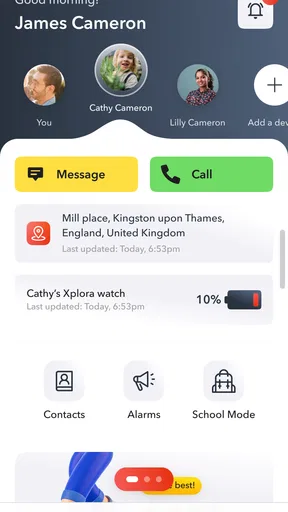
When a child’s watch and phone are part of the same routine, the difficult part is rarely sending a message. The difficult part is deciding how much connection a parent actually needs, how much independence a child should keep, and how much personal information the family is comfortable placing inside one service. That is the space where Xplora tries to be useful: it is a parenting app designed to work with an Xplora kids watch and with a smartphone using Xplora parental control.
I see it less as a general family chat app and more as a companion for families already using Xplora hardware. That distinction matters. If you do not have an Xplora watch or a compatible setup, the app’s value is limited. With the right device, however, it can give parents a more focused place to manage the child’s connected experience instead of asking them to combine ordinary messaging, location tools, school communication and device settings themselves.
The app is free, carries an Everyone age rating, and comes from Xplora App. Its current version is 0.4.1, with support beginning at Android 7.0. Those details make it approachable for families using older Android phones, although compatibility with the child’s particular watch and the exact phone-control arrangement still deserves attention before you build your routine around it.
Why trust is the real test for a parenting companion
Parenting software asks for a different kind of confidence than a casual entertainment app. I am not only asking whether the screens are easy to understand. I am also asking whether the family can tell what is being managed, who can access the account, and when a child is being monitored or contacted. A useful tool should reduce uncertainty rather than quietly create more of it.
Xplora has attracted a 4.3 average from around 19,000 ratings, and it has passed half a million installs. That level of use suggests that many families find the concept practical, but popularity is not a substitute for checking the controls yourself. In a parenting context, trust should come from visible choices and a setup that makes sense to the adults and children using it.
My first recommendation is to treat installation as a family setup session, not as a quick download. Before handing over the watch, I would decide which adults need access, what communication is appropriate, and which situations justify checking in. This avoids a common problem with connected-child products: the technology is ready before the family has agreed on the rules.
The app’s narrow purpose can help here. Compared with a standard messaging app, it is less likely to become another open-ended social space. Compared with a general parental-control suite, it is more closely tied to the Xplora watch experience. That focus may feel reassuring to a parent who wants one child-specific channel, but it can feel restrictive to someone looking for broad control across every device in the home.
What I would verify before relying on it
I would begin by checking the pairing process between the watch and the parent’s phone. The important question is not simply whether the devices connect, but whether the app clearly shows which watch is linked and which adult account is managing it. A clear relationship between account, watch and phone makes later troubleshooting much easier.
I would also inspect every available account and contact setting before normal use. Parenting apps can become confusing when several adults share responsibility, especially after a change in custody arrangements, a new phone or a lost device. If the interface lets you review connected adults or communication choices, do that before an urgent situation occurs. If a setting is unclear, that is a reason to pause rather than assume the safest option.
Another practical check is notification behavior. A parent may expect an urgent message to stand out, while a child may experience repeated alerts as pressure to respond immediately. I would test ordinary messages at home, then adjust notification habits so the watch remains useful without turning every contact into an interruption. This is a small step, but it is one of the best ways to separate genuine safety communication from constant supervision.
Because the product can involve a smartphone with Xplora parental control, I would review the child’s phone arrangement separately from the watch. A watch-first family and a phone-first family may have different expectations. The watch may be used mainly for simple contact, while the smartphone introduces more opportunities for distraction, account confusion and sensitive personal data. The right settings for one device should not automatically be copied to the other.
Visible controls matter more than reassuring language
When I assess an app in this category, I look for choices that are visible at the moment they matter. Can I understand who is contacting the child? Can I distinguish a normal check-in from an important message? Can I tell whether a setting applies to the watch, the phone or the parent account? These details are more meaningful than broad promises about family connection.
I would keep the first week deliberately simple. Add only the adults who genuinely need access, establish the basic communication routine, and avoid changing several controls at once. If something behaves unexpectedly, you will then know which change caused it. This is especially useful for families where one parent handles setup and another needs to use the app later.
A second useful habit is to review the account after a phone replacement or a change in family responsibility. Connected devices often remain part of routines long after people forget how they were configured. A short review of signed-in devices, adult access and contact rules can prevent an old phone or former helper from remaining part of the child’s digital circle.
I would also explain the controls to the child in plain language. Saying “this lets us contact each other” is healthier than presenting the watch as an invisible tracking device. The child should know when a parent may reach out, how to ask for help, and which information should not be shared through the device. That conversation improves trust more than any setting hidden behind a menu.
The moments when data sensitivity becomes real
A family may feel comfortable with connected technology during an ordinary school day, then become much more cautious when the child visits a friend, attends an activity or travels with another adult. Those are the moments when location, contact history, account access and device information can feel more personal. I would review the app before each new routine rather than assuming yesterday’s setup fits every situation.
For example, imagine a child walking from school to a grandparent’s home. The parent wants a dependable way to communicate, but the grandparent may not need access to every family setting. I would use the smallest group of adults necessary, agree on who is responsible for checking in, and avoid duplicating messages from several people. This reduces confusion for the child and limits unnecessary exposure of family information.
Another realistic situation is a sleepover. The watch may be useful for reassurance, but the host family may have different expectations about devices. I would tell the supervising adult that the child has the watch, decide whether it should remain active in the usual way, and make sure the child knows how to contact a parent without feeling watched by everyone present. The best setup is not always the most restrictive one; it is the one that matches the setting.
Travel creates a different trade-off. A parent may want the child to remain reachable while moving through an unfamiliar place, yet shared phones, temporary caregivers and public networks can make account discipline more important. I would avoid handing the main account to another person just for convenience. If another adult must help, I would use the narrowest legitimate access available and remove it when the trip ends.
I am careful not to treat a parenting app as a replacement for conversation or adult supervision. A connected watch can support a plan, but it cannot judge whether a situation is safe, explain a misunderstanding or notice that a child is frightened. The app is most valuable when it supports an agreed family routine rather than becoming the routine itself.
Where Xplora fits beside ordinary alternatives
The usual alternative is a normal smartphone with messaging and whatever parental settings the operating system provides. That route can be more flexible, particularly for older children who need school apps, transport tools and broader communication. It can also be harder to manage because the parent is balancing many unrelated services and the child has access to more distractions.
Xplora’s advantage is concentration. Its purpose is tied to an Xplora kids watch and parental control on a smartphone, so the family can approach the setup as one child-focused system. I like that direction for younger children who need a dependable contact path without being given a fully open social environment. The trade-off is that the family is committing to the Xplora ecosystem rather than choosing the most flexible device mix.
A general parental-control app may be a better choice for a household with several children using different brands, or for parents who need one dashboard across phones, tablets and computers. Those tools can offer broader device management. They may also bring more settings to learn, which is not automatically better for a family that only wants a straightforward watch connection.
Ordinary phone calls and text messages remain the simplest option when the child already has a suitable phone and the family does not need a watch-centered arrangement. I would choose that simpler path for an older child who can manage contacts responsibly and for parents who dislike maintaining a separate device ecosystem. Xplora makes more sense when the watch itself is central to the family’s plan.
Small workflow choices that improve everyday use
My first practical tip is to create a clear check-in rhythm instead of sending frequent “Where are you?” messages. For a school day, one agreed message after arrival and another before the journey home may be enough, depending on the child’s age and circumstances. This keeps the app from becoming a stream of interruptions and teaches the child that communication has a purpose.
My second tip is to separate urgent contact from routine contact in the family’s language. Use a simple phrase that means “please respond soon” and another that means “reply when convenient.” The app can carry the message, but the family still needs a shared system for interpreting it. This is particularly helpful when several adults can contact the same child.
My third tip is to perform a monthly account review, even if nothing seems wrong. Check who still needs access, whether the child understands the current rules and whether the watch is being used for its original purpose. A review is also a good time to ask the child what feels helpful or intrusive. That feedback can reveal problems that a technical settings screen will never show.
I would keep the parent’s phone protected with its own lock and avoid leaving the account open on a shared device. This is basic digital hygiene, but it matters more when the app is connected to a child’s communication routine. I would also avoid discussing sensitive family matters through a channel intended for quick child-parent contact. A dedicated tool should not become a storage place for every private conversation.
Finally, I would test the arrangement during a calm afternoon rather than waiting for a stressful moment. Ask the child to make a normal contact attempt, have the parent respond, and confirm that both sides understand what happens next. This trial exposes dead batteries, muted notifications, confusing instructions or misplaced expectations before the family depends on the system outside the home.
Who will appreciate it, and who should skip it
I think this app is a good match for parents who already use an Xplora kids watch and want a focused way to stay connected. It is especially suitable for younger children who need a controlled communication channel, families establishing a first independent school commute, and households that prefer a watch-based routine over giving a child a fully featured smartphone.
It is less convincing for families that want a universal parental-control dashboard. If your children use a mixture of devices and you need broad management from one place, a platform designed around multiple operating systems may fit better. I would also look elsewhere if your priority is advanced organization, shared calendars or general family messaging rather than the Xplora watch relationship.
Parents who are uncomfortable with connected-child technology should not feel pressured to adopt it simply because it is convenient. The right choice may be a basic phone, a written check-in plan or ordinary calls. Technology should solve a real family problem; it should not create a new expectation that a child must always be reachable.
There is also a maturity question. A child who can already manage a smartphone, understand privacy boundaries and communicate responsibly may find a watch-centered system too limited. Conversely, a younger child may benefit from the simpler arrangement but still need an adult to explain privacy, device care and appropriate contact. The app does not remove that teaching responsibility.
My cautious verdict after looking at the whole setup
Xplora is most appealing when viewed as a focused parenting companion rather than a complete digital family-management solution. Its connection to an Xplora kids watch gives it a clear role, and the free price makes it easy to consider alongside compatible hardware. I appreciate the possibility of keeping a child reachable without immediately opening the door to every feature of a conventional smartphone.
My confidence in it would depend on disciplined setup. I would not install it, hand over the watch and forget about the account. I would review adult access, explain the communication rules, test notifications and revisit the arrangement after changes in school, travel or caregiving. Those steps are not unique to one app, but they are particularly important when a child’s device is involved.
The strongest reason to choose it is simplicity within the Xplora ecosystem. The strongest reason to skip it is the same limitation: families outside that ecosystem may gain little, while families needing broad controls across many devices may outgrow the focused approach. In my view, it is worth considering for the right watch-owning family, provided the adults treat privacy, access and independence as part of the setup rather than as afterthoughts.
With around 500,000 installs and an Everyone rating, it is clearly positioned for ordinary family use, not a specialist audience. Still, the most responsible recommendation is a conditional one: choose it when the Xplora watch solves a genuine communication need, keep the visible controls under regular review, and let the child understand how the system works. Used that way, it can support reassurance without turning every moment of childhood into a monitoring exercise.
Verdict
Strengths of Xplora
- Kid-focused design is simple to navigate and easy for younger users.
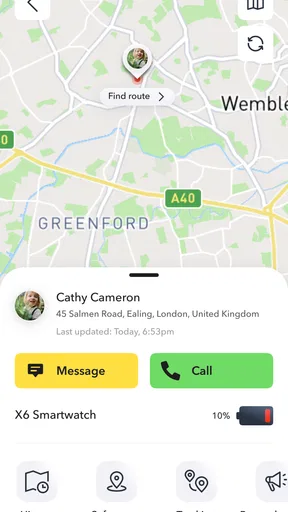
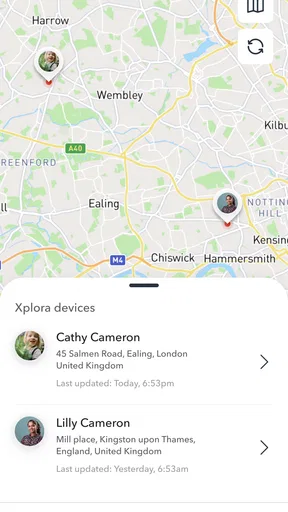
- GPS location sharing helps parents check where their child is.
- School mode can reduce distractions during class hours.
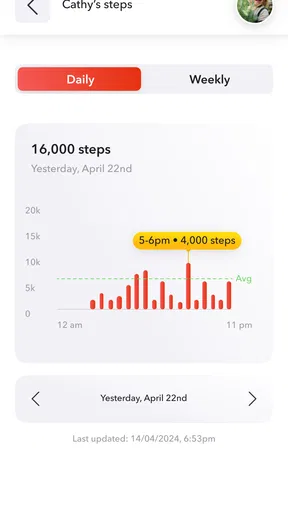
- The watch can encourage children to stay active with step goals.
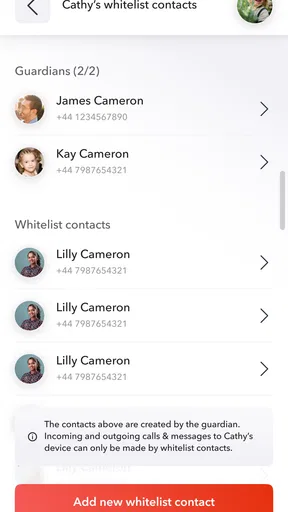
- Parent-approved contacts limit communication to trusted people.
Limitations of Xplora
- Many useful features require a compatible Xplora watch.
- GPS accuracy may vary indoors or in areas with weak coverage.
- A monthly mobile subscription can add to the overall cost.
- Battery life may decrease quickly with frequent location updates.
- Some children may find parental controls too restrictive.
Similar Picks in This Category
View All
Family Space
Motorola Mobility LLC.3.9

شرطة الأطفال - مكالمة وهمية
Oub Apps4.1

Findmykids: Parental Control
LETEM LTD4.6

Pregnancy + | Tracker App
Philips Electronics UK Limited4.8

Policía de niños - para padres
Kids police4.7

Pregnancy App
Amila4.9
Frequently Asked Questions
What is Xplora and what can parents use it for?
Xplora is a child-focused smartwatch and companion app designed to help parents stay connected with their children without giving them unrestricted access to a smartphone. Depending on the watch model and subscription, parents can use it for calls, approved contacts, location tracking, voice messages, activity monitoring, school mode, and safety features such as an SOS button. Available functions may vary by country and device.
Does Xplora require a subscription or a SIM card?
Yes, most Xplora watches require mobile connectivity through a compatible SIM or an Xplora service plan to use calling, messaging, GPS location, and other online features. The exact subscription options, network compatibility, activation requirements, and pricing depend on the country and specific watch model. Before downloading or purchasing, parents should verify coverage, supported networks, and any recurring fees.
How accurate is Xplora’s location tracking?
Xplora uses available GPS, Wi-Fi, and mobile network signals to estimate the child’s location. Outdoor GPS tracking is generally more precise than indoor positioning, where buildings and weak signals can affect results. Location updates may also depend on battery level, network coverage, device settings, and the selected tracking interval. It should be treated as a helpful safety tool, not a guaranteed real-time locator.
Can children contact anyone through an Xplora watch?
Xplora is built around a parent-managed contact list, so children normally can communicate only with approved contacts added through the companion app. This limits unwanted calls and messages and gives parents greater control over communication. Depending on the model, children may be able to make calls, send voice messages, or use predefined options, while unknown numbers and unrestricted social media access are generally not supported.
Is Xplora suitable for every child, and what should parents consider before using it?
Xplora can be useful for children who need a simple way to contact family members while parents want location and safety features without providing a full smartphone. However, parents should consider the child’s age, responsibility, privacy expectations, battery life, network coverage, subscription costs, and school policies. Location tracking should also be discussed openly with the child so the device supports safety without replacing trust or supervision.
